Hi folks, here is again an article about a thing from the miraculous world of web software development that drives me crazy.
Unfortunately, the situation changed as soon as I deployed my application on my IIS 7.5 web server. There nothing was available in the first place.
Further environment characteristics:

Deploying on my IIS and running the same thing resulted in this (note: the greyed out area is the URL to the PC, the IIS is running on):

This is where I began searching the web for possible solutions for my problem. One source I found very promising was the following forum thread where the solution to the initial post seemed to fit my needs quite well:
How to get Windows user name when identity impersonate=“true” in asp.net?
Following the advices of stackoverflow, I added a line
To change the IIS properties, first launch IIS (internet information services) in admin mode. Select your site you want to adjust (in my case TestApp) and double click on the "Authentication" Button. In a screenshot this looks like this (please forgive my German speaking screen ;)):

In the "Authentication" section, switch of everything but Windows-authentication:

Then I re-started my application and ... ran into the next problem. Now a login popup window asked me to provide a user and a password. I tried my normal MyDomain\MyUser and normal password without success. I guess I had to create dedicated user on my local PC, which I didn't want as I didn't want to put the login burdon on my users.
Background
Currently I am writing a database ASP.NET application to be used within our company's intranet. I want to restrict the data from the database accessible by my users, so I need the user name to perform user-specific selects on the database. In Visual Studio debugging mode, everything works works fine: the user name is available by using the variable:System.Security.Principal.WindowsIdentity.GetCurrent().NameUnfortunately, the situation changed as soon as I deployed my application on my IIS 7.5 web server. There nothing was available in the first place.
Further environment characteristics:
- OS (development & webserver): Windows 7 Enterprise
- IDE: Visual Studio Express for Web Development 2012
- IIS: 7.5 installed on my development machine (local admin required)
- Database: SQL Server 2008 R2 (not important here, but for completeness)
Starting Point
As described in the Introduction, I started having a working application, which even worked in the sense of providing a user name in debugging mode. The minimal web.config provided as standard by Visual Studio looks like this:
<?xml version="1.0" encoding="utf-8"?>


<configuration>

    <system.web>

      <compilation debug="true" targetFramework="4.5" />

      <httpRuntime targetFramework="4.5" />

    </system.web>

</configuration>
Note: this simple configuration is only provided if you choose the "Empty ASP.NET Web Application". It can as well be more complex.
However, running this simple application from within Visual Studio in debugging mode produces the following output:Deploying on my IIS and running the same thing resulted in this (note: the greyed out area is the URL to the PC, the IIS is running on):
This is where I began searching the web for possible solutions for my problem. One source I found very promising was the following forum thread where the solution to the initial post seemed to fit my needs quite well:
How to get Windows user name when identity impersonate=“true” in asp.net?
Setting Up Web.Config and IIS
According to the stackoverflow-thread above, the problem can be cured by adjusting the web.config file of my development project and by adjusting the settings in IIS.Following the advices of stackoverflow, I added a line
<authentication mode="Windows"> to my web config, which looked like this:
<?xml version="1.0" encoding="utf-8"?>


<configuration>

    <system.web>

      <compilation debug="true" targetFramework="4.5" />

      <httpRuntime targetFramework="4.5" />

      <authentication mode="Windows" />

    </system.web>

</configuration>
If you do this, please do not forget to re-publish your site to IIS.To change the IIS properties, first launch IIS (internet information services) in admin mode. Select your site you want to adjust (in my case TestApp) and double click on the "Authentication" Button. In a screenshot this looks like this (please forgive my German speaking screen ;)):

In the "Authentication" section, switch of everything but Windows-authentication:

Then I re-started my application and ... ran into the next problem. Now a login popup window asked me to provide a user and a password. I tried my normal MyDomain\MyUser and normal password without success. I guess I had to create dedicated user on my local PC, which I didn't want as I didn't want to put the login burdon on my users.
Login Popup Problem
As described above, now I had this s***ty lobin popup coming up again and again and it took me about 2 days to find a solution to this. Before I come to this, I'd like to tell what I checked:
- WebMatrix.*.dll in BIN diectory of my app according to a stackoverflow thread. This was actually a nobrainer as my app was not based on MVC3.
- Combinations of impersonation in IIS and in web.config, like in this thread
- I checked all the settings about security zones (added my site to trusted sites) and authentication settings in IE advanced options
- Some more stuff I don't remember. Nothing worked...
The breakthrough came through an msdn blog: "Things to check when Kerberos authentication fails using IIS/IE…". Somewhere in the lower part, they mention "Are the client and server on the same box?" and guess what - I tested all the time on my local machine where as well my webserver sits. So finally I switched to another machine - configuration of web.config and IIS as described in the previous chapters - and the thing worked. Actually one thing I had to do was to delete my application completely from the server and re-publish it again and afterwards it worked.
My test application yields the following result:
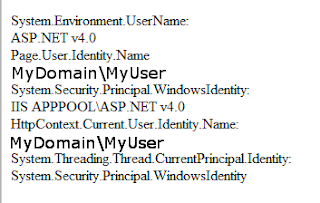 Conclusion: The required user information is available via:
My test application yields the following result:
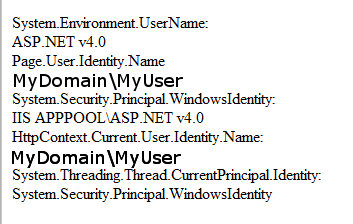
- Page.User.Identity.Name
- HttpContext.Current.User.Identity.Name
Test Application
To have a handy look at the variables, I programmed a little test application with output for the parameters interesting for me. This Application has one screen:
The three Label_* fields are filled in the Page_Load method:
That was it, I hope you can get something out of my findings
Cheers
W
<%@ Page Language="C#" AutoEventWireup="true" CodeBehind="Default.aspx.cs" Inherits="TestApp.WebForm1" %>
<!DOCTYPE html>
<html xmlns="http://www.w3.org/1999/xhtml">
<head runat="server">
<meta http-equiv="Content-Type" content="text/html; charset=utf-8"/>
<title></title>
</head>
<body>
<form id="form1" runat="server">
<div>
System.Environment.UserName:<br />
<asp:Label ID="Label_Environment" runat="server" Text="Label" Width="300px"></asp:Label>
<br />
Page.User.Identity.Name<br />
<asp:Label ID="Label_PageIdentity" runat="server" Text="Label" Width="300px"></asp:Label>
<br />
System.Security.Principal.WindowsIdentity:<br />
<asp:Label ID="Label_Principal" runat="server" Text="Label" Width="300px"></asp:Label>
<br />
HttpContext.Current.User.Identity.Name:<br />
<asp:Label ID="Label_HttpContext" runat="server" Text="Label" Width="300px"></asp:Label>
<br />
System.Threading.Thread.CurrentPrincipal.Identity:<br />
<asp:Label ID="Label_Threading" runat="server" Text="Label" Width="300px"></asp:Label>
</div>
</form>
</body>
</html>
The three Label_* fields are filled in the Page_Load method:
protected void Page_Load(object sender, EventArgs e)
{
Label_Environment.Text = System.Environment.UserName.ToString();
Label_PageIdentity.Text = Page.User.Identity.Name;
Label_Principal.Text = System.Security.Principal.WindowsIdentity.GetCurrent().Name.ToString();
Label_HttpContext.Text = HttpContext.Current.User.Identity.Name;
Label_Threading.Text = System.Threading.Thread.CurrentPrincipal.Identity.ToString();
}
That was it, I hope you can get something out of my findings
Cheers
W